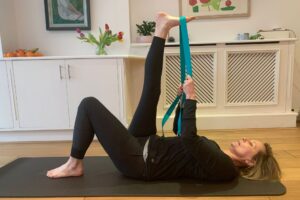
Lately, quite a few clients have asked me for tips on how to keep their backs happy while working from home.
The lockdown due to COVID-19 has forced many of us to work from home and for many, this means missing out on the daily walk to and from work, the chance to hit the gym or and an inclination to stretch out and watch Netflix rather than stretching out in a Pilates class.
You’re now spending long days at your home desk, or dining room table. Without Occupational Health at home ensuring your work environment is ergonomic and suited for long periods sat down working, it’s likely that working from home is putting stresses and strains on your back that it just isn’t used to. So, you might be feeling more pain and discomfort than usual.
Movement is crucial to keeping your body and back happy, so here’s a short video with some exercises that you can do at home to release your back and hips and to take some of the pressure off your back.

I hope you find this routine useful and if you practice it every day you should find your back is feeling better soon. Why not add it to your lunch break so you really do take some time away from your desk!
Even though movement is crucial in keeping your back happy there are a few more things you can do to avoid pain while working from home. That’s why I’ve compiled my top 5 tips for looking after your back while working from home.
1 – Practice better posture for your back
No matter from where you work, sitting at a desk or table for long hours makes it likely to fall into bad posture habits and your back starts to tense up causing pain and strain in surrounding muscles.
What makes it worse working from home is that you have no colleagues calling you to get up and meet them for a chat at the water cooler or to walk to your favourite place for lunch. Instead of moving to the boardroom for the weekly meeting, you’re moving to a different browser tab to open Zoom and you just don’t have the cause (or the motivation) to move around as much as you would at work.
So, how can you become aware of your posture and improve it?
Sit with both feet on the floor or if you can’t reach the floor use a footrest or a pile of books to place the feet on. Now, take a moment to sense your back’s position – are you leaning forward slightly? Are you leaning back into your chair so much that you’re almost reclining?
A good posture means sitting with a relaxed back in a neutral position so no straight-up military-style rigidity and no bending forwards or leaning back either. If you need to, use a small cushion just behind your lower back to give you a little more support while sitting.
Standing desks may be better for back health and good posture, so can you get creative and make your own at home? Is there a shelf that’s just the right height to work from, or maybe you could stack boxes/books and put your laptop on top so you can attend the next online meetings in standing (just make sure it’s not likely to fall or get knocked over!)
Make sure you change your position and posture frequently and remember, your next posture is your best posture.
2. Your laptop/pc screen should be positioned at eye level
Are you craning forward to look at your computer screen?
This is one of the biggest causes of neck strain and subsequent back pain (and one of the first things that’s looked for in an office risk assessment for health and safety).
Using a laptop or monitor stand is a good way to adjust the level of your screen so that your eyes are parallel with the top edge of the screen, that way you should be able to use your eyes to see the entire screen rather than having to adjust your body position.
Whether you’re sitting or standing to use your computer, try to keep your neck long rather than short and scrunched up which can cause tight neck muscles. Try rolling your shoulders back and moving your head up and down and from side to side every once in a while, to release any tension.
To give your eyes a break and keep your visual muscles healthy, take a moment to look out of your window to faraway places and people. Not only is it fun and a good way to break up the day by seeing what’s going on outside, different muscles are used to look into the distance than close up on a computer screen, so you’ll be giving your eyes a break while keeping them healthy.
3. Be aware of how much time you’re working at your desk
Just because you no longer have the commute to and from work doesn’t mean you should spend that additional time at your desk working
Working 10 hours straight isn’t good for your back, for your concentration or for your work. So, be clear on when your working day starts and ends, and stick to it!
Set yourself a reminder to get up, walk/move around and do some stretches – this is a great time to use the routine I share in the video above. The pomodoro technique is a great way to do this by having set periods of time to focus on work and set break times to move around and release that pain-causing tension.
Even if you don’t want to move around and get too distracted from the task at hand, change your sitting position for a few minutes from slouching to straight, or from sitting to standing. Shift your weight from one side of your body to the other and back to neutral again.
You could also use one of these big exercise balls (also called Swiss ball) to sit on for a while, it will force your body into a different posture. Use the time of a phone call to walk around, have your tea break in the garden, read any reports or memos while lying on the floor etc. Just remember to move often!
4. Avoid working from the sofa
We’ve all felt run down from time to time and needed to work from the sofa but doing so regularly is bad for your back health. It’s difficult to sit for long periods on a sofa without slouching or curling your legs beneath you. This might be ok for a short while but keeping these positions for any length of time will ruin your posture and your back will be paying the price for it.
Try to save the sofa for your downtime and have a dedicated chair to work at by your desk instead. This will help you shift from work time to break and family time more easily as you literally have to move from one area to another and will ensure that your back is better supported while you do work.
If you do decide that working from your sofa is something you want to do, invest in a laptop tray/stand so your laptop is not resting on your legs and the screen is at the right eye level. Make sure you support your back with pillows and do make sure you’re still moving often. Because you might be sitting more comfortably (or even lying down) you might not feel your back gaining tension but you’re still in one position for an extended length of time, so break often and move!
5. Keep moving for as long as possible
No commute doesn’t mean that you can’t incorporate some consistent movement into your day. Why not draw a clear line between work time and home time by taking a walk around your neighbourhood at the end of your working day?
There are always new things to discover in your local surroundings as nature and weather changes, so make it a habit to look out for what’s new. Maybe some beautiful flowers have blossomed in your neighbour’s garden that you can’t see from the window or some new buildings are being constructed near you (it might be fun to photograph each day and document their progress!)
If you’re finding it difficult to motivate yourself for regular exercise, why not sign up for an online workout or Pilates class? Joining a group can not only help you stay social, but it also gives you that extra nudge of accountability to actually do some exercise! You’ll find an online class to suit you whether that’s 1:1 with a personal trainer or in a group with others in their own homes.
The main thing is to keep moving during the day. Your back will be happier and healthier for it!